

You walk into a café, open your laptop, connect to the local WiFi and want to quickly check a patient's record before an afternoon procedure. It seems innocent – but from a data-protection and cybersecurity standpoint it is one of the most dangerous scenarios a clinician can encounter.
01The real riskWhat actually happens on public WiFi
Public WiFi networks – in cafés, train stations, hotels – are by nature unencrypted or encrypted with a shared password every guest knows. An attacker on the same network can run a so-called man-in-the-middle attack: they sit between your browser and the server and intercept the data in transit. If the cloud system communicates strictly over HTTPS with a valid TLS certificate, the data is encrypted in transit and this attack is practically ineffective. The problem arises in three situations: the system uses unencrypted HTTP (rare today, but it exists), the attacker injects a fake certificate (SSL stripping), or the device itself is compromised by malware.
The second risk is less technical, but just as real: shoulder surfing – someone sitting behind you reads the patient's name, diagnosis or ID number directly from your screen. Medical records fall under GDPR's special categories of personal data, and their leakage – even unintentional – triggers a duty to notify the supervisory authority.
02Hotspot vs. public WiFiWhy your own phone is a different league
Switching to a personal hotspot from your mobile phone is significantly better from a security standpoint. Mobile data (4G/5G) is encrypted at the radio level by the carrier and the hotspot creates an isolated network that no outsider connects to without your password. An attacker in the café has no access to your mobile network.
A hotspot isn't perfect – if the phone itself is infected, or you use a weak hotspot password, the risk comes back. But compared to an open or shared café WiFi the difference is fundamental. For working with medical records outside the office, your own hotspot is the standard, not a luxury.
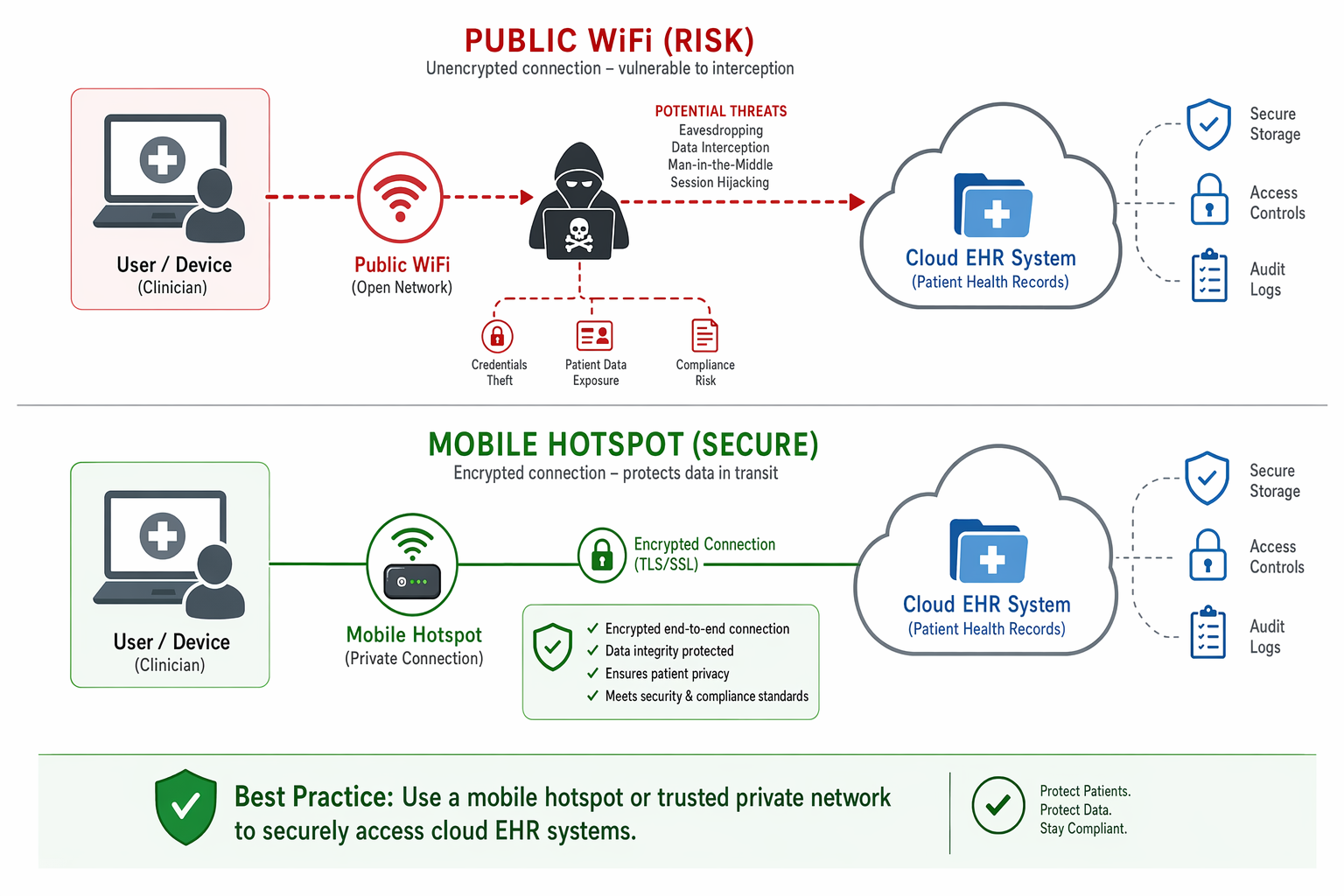
03The cloud systemWhat your provider must deliver
Before you start relying on "the cloud will handle it", verify a few concrete items with your health-system provider:
- HTTPS everywhere – all communication must use TLS 1.2 or higher. No exceptions for internal pages or APIs.
- Multi-factor authentication (MFA) – password-only login is not enough. An SMS code or an authenticator app (Google Authenticator, Microsoft Authenticator) substantially reduces the risk if credentials are stolen.
- Session timeout – the system should auto-log out an idle session after a few minutes. A forgotten open browser in a café is a security incident.
- Audit log – every access to a patient record should be logged with a timestamp and user identity. If an incident occurs, you must be able to prove who accessed what and when.
- Encryption at rest – data on the provider's servers should be encrypted, not just in transit.
A system is only as secure as its weakest link – and the weakest link is almost always the user in the wrong environment.
Anderson R. · Security Engineering, 2020
04Practical rulesWhat to do from tomorrow
The security of medical records outside the office doesn't rest on one decision – it's a set of habits:
- Always use your own mobile hotspot instead of public WiFi when working with patient data.
- Turn on MFA on your health system if you don't have it yet – most cloud solutions offer it but it isn't always on by default.
- Use a screen privacy filter (polarising film on the display) on your laptop if you regularly work on the move.
- Never leave an open session unattended – stepping away from your desk, lock the screen.
- Review your provider contract: where the data is physically stored, who has access, and how incidents are handled. As the data controller, you are accountable for your processors too.
- Train the team internally – if nurses or receptionists use the system, the same rules apply to the whole team.
Public café WiFi isn't a forbidden zone – but for medical records it is an environment that requires a conscious decision and the right technical measures. Your own hotspot, MFA and a locked screen are the minimum every clinician working outside the office can manage.

🌍 Cicero System🎓 Dental Education | 🛒 Procurement | 🏥 Clinic Management